
Will readiness checklist
You may have a successor in mind for your family business, or a last wish about who should inherit your home. Whether you live in the UAE or live abroad and own assets here, our Will readiness checklist shows you which documents to gather before we draft your will.
The Will readiness checklist is optional. If you’d prefer personal assistance for any reason, you’re always welcome to contact us directly. You can get in touch at any stage, including before you start the checklist.
Your situation
Which documents do I need to send?
Before you email us your documents, you can use the document checker to check that your PDFs are complete and readable. It will show you what needs correcting and let you download each file with the correct name.
Answer the questions above to complete your list.
Your documents
Please include a clear copy of your passport and, if you have a partner, a clear copy of your partner’s passport. Save each passport as a separate PDF.
For the Arabic translation, we need a copy of the Emirates ID of everyone named in your will who holds one, including children. Please send the front and back together in one PDF per person. The translator uses the spelling on the card to write each person’s name correctly in Arabic.
Save each document as a separate PDF of no more than 2 MB. For identity documents, include the person’s role, name and document type in the file name, for example ExecutorJanDeVriesEID.pdf. If you are sending several PDFs, put them in one ZIP file and send them together in a single email.
Based only on what you entered. Nobody has checked these facts or your documents, so this is not advice on your case.
0 of 1 files ticked
Passport example
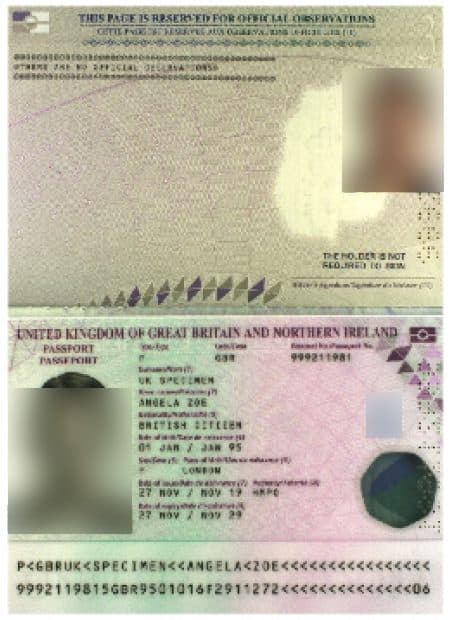
Scanning your passport with a phone?
Open your passport at the page with your photo and personal details. A clean glass shelf from your fridge can hold it flat and keep your fingers out of the picture. Turn off the flash, check the glass for reflections and hold your phone directly above the passport. Make sure the entire photo page and the facing page are visible. Crop out the table while keeping all four outer corners in view. If your passport has a separate signature page that needs to be included, scan that page too. Save the pages together as one PDF. Open it before you send it and check that every page is upright and easy to read.
Signing a DIFC Will
If your will is a DIFC Will, it is signed electronically by video with DIFC Courts. See 10 tips and tricks for signing your DIFC Will electronically.